---
title: Autohost Reseller Billing Report
description: Reseller Billing Report
---
[Skip to content](https://help.autohost.ai/knowledge/autohost-reseller-billing-report#main-content)
English
Show submenu for translations
[Contact us](https://help.autohost.ai/knowledge/kb-tickets/new?hsLang=en)
[](https://www.autohost.ai/?hsLang=en)
Open main navigation
Close main navigation
- English
Show submenu for translations
- [Contact us](https://help.autohost.ai/knowledge/kb-tickets/new)
- [AI Agent](https://www.autohost.ai/chat)
[AI Agent](https://www.autohost.ai/chat?hsLang=en)
How can we help you?
- There are no suggestions because the search field is empty.
1. [Autohost Help Center](https://help.autohost.ai/knowledge?hsLang=en)
2. [Account Settings](https://help.autohost.ai/knowledge/account-settings?hsLang=en)
3. [Data & Reports](https://help.autohost.ai/knowledge/account-settings?hsLang=en#data-reports)
# Autohost Reseller Billing Report
Accessing your report in Autohost is a straightforward process. Here’s how you can do it:
1. **Log into Your Autohost Account:**
- Open your web browser and log into your Autohost account using your credentials.
2. **Navigate to the Reports Section:**
- From the left-side menu, navigate to the **Billing \> Reports** section.
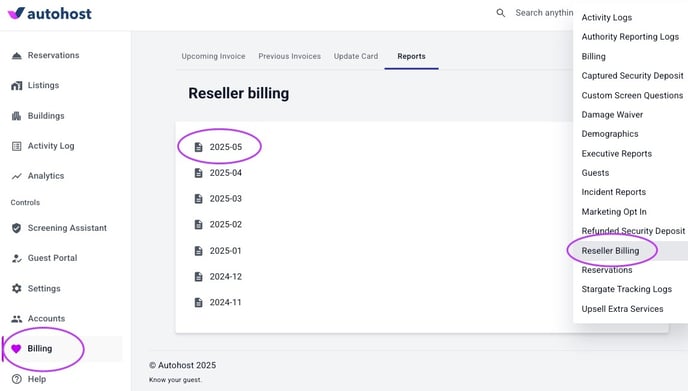
3. **Select the Reseller Billing Report:**
4. **Download the Report:**
- - Click on the desired month to generate a secure download link. Click again to begin download. Save the report in a secure location for future reference.
- [Getting Started](https://help.autohost.ai/knowledge/getting-started?hsLang=en#main-content)
- [Apaleo](https://help.autohost.ai/knowledge/getting-started?hsLang=en#apaleo)
- [Cloudbeds](https://help.autohost.ai/knowledge/getting-started?hsLang=en#cloudbeds)
- [Escapia](https://help.autohost.ai/knowledge/getting-started?hsLang=en#escapia)
- [Guesty](https://help.autohost.ai/knowledge/getting-started?hsLang=en#guesty)
- [Hospitable](https://help.autohost.ai/knowledge/getting-started?hsLang=en#hospitable)
- [Hostaway](https://help.autohost.ai/knowledge/getting-started?hsLang=en#hostaway)
- [Hostfully](https://help.autohost.ai/knowledge/getting-started?hsLang=en#hostfully)
- [Mews](https://help.autohost.ai/knowledge/getting-started?hsLang=en#mews)
- [Streamline](https://help.autohost.ai/knowledge/getting-started?hsLang=en#streamline)
- [Track](https://help.autohost.ai/knowledge/getting-started?hsLang=en#track)
- [Account Settings](https://help.autohost.ai/knowledge/account-settings?hsLang=en#main-content)
- [User Accounts](https://help.autohost.ai/knowledge/account-settings?hsLang=en#user-accounts)
- [Settings](https://help.autohost.ai/knowledge/account-settings?hsLang=en#settings)
- [Billing](https://help.autohost.ai/knowledge/account-settings?hsLang=en#billing)
- [Integrations](https://help.autohost.ai/knowledge/account-settings?hsLang=en#integrations)
- [Data & Reports](https://help.autohost.ai/knowledge/account-settings?hsLang=en#data-reports)
- [Verifications and Risk](https://help.autohost.ai/knowledge/verifications-and-risk?hsLang=en#main-content)
- [Screening AI](https://help.autohost.ai/knowledge/verifications-and-risk?hsLang=en#screening-ai)
- [Screening Assistant Settings](https://help.autohost.ai/knowledge/verifications-and-risk?hsLang=en#screening-assistant-settings)
- [Types of Verifications and Checks](https://help.autohost.ai/knowledge/verifications-and-risk?hsLang=en#types-of-verifications-and-checks)
- [Listings](https://help.autohost.ai/knowledge/listings?hsLang=en)
- [Message Setup](https://help.autohost.ai/knowledge/message-setup?hsLang=en)
- [Guest Portal Setup](https://help.autohost.ai/knowledge/guest-portal-setup?hsLang=en#main-content)
- [Guest Portal Settings](https://help.autohost.ai/knowledge/guest-portal-setup?hsLang=en#guest-portal-settings)
- [Guest Portal Screen Configuration](https://help.autohost.ai/knowledge/guest-portal-setup?hsLang=en#guest-portal-screen-configuration)
- [Managing Reservations](https://help.autohost.ai/knowledge/managing-reservations?hsLang=en)
- [Autohost Product & Policies](https://help.autohost.ai/knowledge/autohost-product-policies?hsLang=en#main-content)
- [Privacy & Risk](https://help.autohost.ai/knowledge/autohost-product-policies?hsLang=en#privacy-risk)
- [Booking Channels (OTA)](https://help.autohost.ai/knowledge/autohost-product-policies?hsLang=en#booking-channels-ota)
- [Product Release Notes](https://help.autohost.ai/knowledge/autohost-product-policies?hsLang=en#product-release-notes)
- [FAQ](https://help.autohost.ai/knowledge/faq?hsLang=en#main-content)
- [Account, User & Payment FAQs](https://help.autohost.ai/knowledge/faq?hsLang=en#account-user-payment-faqs)
- [Reservation Management FAQs](https://help.autohost.ai/knowledge/faq?hsLang=en#reservation-management-faqs)
- [Product FAQs](https://help.autohost.ai/knowledge/faq?hsLang=en#product-faqs)
- [PMS & OTA FAQs](https://help.autohost.ai/knowledge/faq?hsLang=en#pms-ota-faqs)
- [Guest FAQs](https://help.autohost.ai/knowledge/faq?hsLang=en#guest-faqs)
- [Autohost SDK](https://help.autohost.ai/knowledge/autohost-sdk?hsLang=en)
[](https://help.autohost.ai/knowledge?hsLang=en)
Autohost Help Center
Copyright © 2025, Autohost.ai