---
title: Settings by Booking Source
description: With source settings, you can adjust your Guest Portal flow according to the booking source of the reservation. (E.g. For Airbnb guests, you can make certain screens "disabled" or "required.") Note: T
---
[Skip to content](https://help.autohost.ai/knowledge/guest-portal-booking-source#main-content)
English
Show submenu for translations
[Contact us](https://help.autohost.ai/knowledge/kb-tickets/new?hsLang=en)
[](https://www.autohost.ai/?hsLang=en)
Open main navigation
Close main navigation
- English
Show submenu for translations
- [Contact us](https://help.autohost.ai/knowledge/kb-tickets/new)
- [AI Agent](https://www.autohost.ai/chat)
[AI Agent](https://www.autohost.ai/chat?hsLang=en)
How can we help you?
- There are no suggestions because the search field is empty.
1. [Autohost Help Center](https://help.autohost.ai/knowledge?hsLang=en)
2. [Guest Portal Setup](https://help.autohost.ai/knowledge/guest-portal-setup?hsLang=en)
3. [Guest Portal Settings](https://help.autohost.ai/knowledge/guest-portal-setup?hsLang=en#guest-portal-settings)
# Settings by Booking Source
With source settings, you can adjust your Guest Portal flow according to the booking source of the reservation. (E.g. For Airbnb guests, you can make certain screens "disabled" *or* "required.")
**Note:** These configurations will override your listing settings.
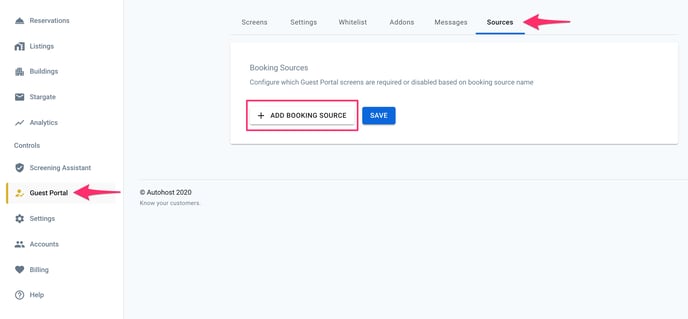
Go through Guest Portal \> Sources, then click to "add booking source."
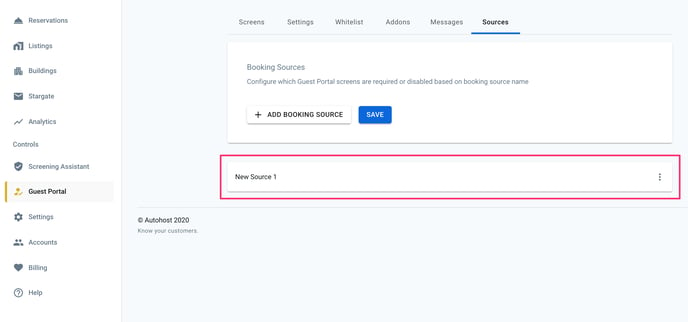
At this point, you'll see a new source has been added. Click on the three dots at the right-hand side.
Within the options below, click to "rename" the source. Add the name of the booking source you wish to configure.
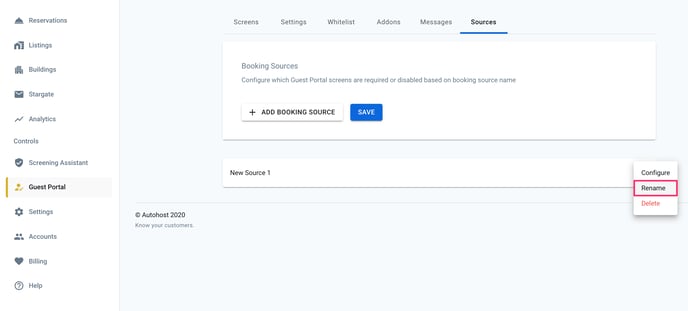
**IMPORTANT NOTE:** Make sure to write the booking source name *exactly* as it appears in the "Reservations" tab (i.e. correct spelling, capitalization and punctuation), otherwise, your reservations will *not* be pulled from this source.
E.g. Write "Booking.com"
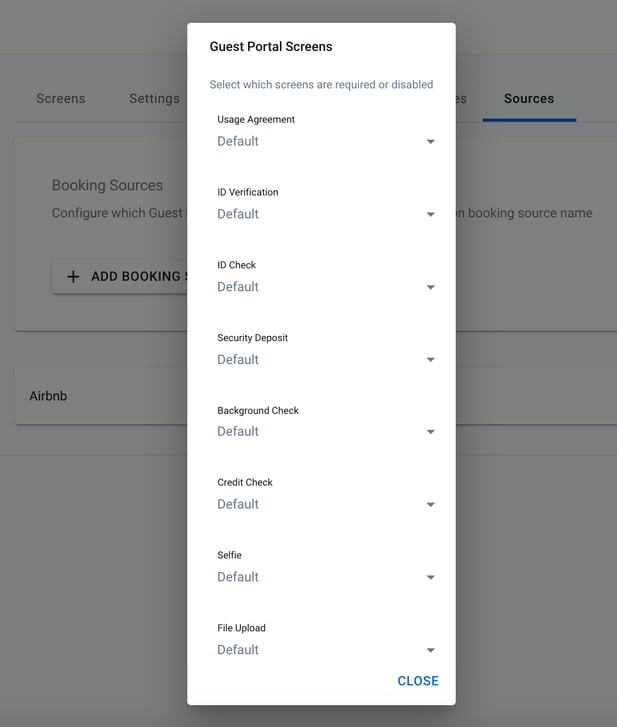
Once you've named the source, you can go ahead and "configure" it based on your internal business practices. As shown above, you can choose to keep a screen as default, or change it to required or disabled.
- [Getting Started](https://help.autohost.ai/knowledge/getting-started?hsLang=en#main-content)
- [Apaleo](https://help.autohost.ai/knowledge/getting-started?hsLang=en#apaleo)
- [Cloudbeds](https://help.autohost.ai/knowledge/getting-started?hsLang=en#cloudbeds)
- [Escapia](https://help.autohost.ai/knowledge/getting-started?hsLang=en#escapia)
- [Guesty](https://help.autohost.ai/knowledge/getting-started?hsLang=en#guesty)
- [Hospitable](https://help.autohost.ai/knowledge/getting-started?hsLang=en#hospitable)
- [Hostaway](https://help.autohost.ai/knowledge/getting-started?hsLang=en#hostaway)
- [Hostfully](https://help.autohost.ai/knowledge/getting-started?hsLang=en#hostfully)
- [Mews](https://help.autohost.ai/knowledge/getting-started?hsLang=en#mews)
- [Streamline](https://help.autohost.ai/knowledge/getting-started?hsLang=en#streamline)
- [Track](https://help.autohost.ai/knowledge/getting-started?hsLang=en#track)
- [Account Settings](https://help.autohost.ai/knowledge/account-settings?hsLang=en#main-content)
- [User Accounts](https://help.autohost.ai/knowledge/account-settings?hsLang=en#user-accounts)
- [Settings](https://help.autohost.ai/knowledge/account-settings?hsLang=en#settings)
- [Billing](https://help.autohost.ai/knowledge/account-settings?hsLang=en#billing)
- [Integrations](https://help.autohost.ai/knowledge/account-settings?hsLang=en#integrations)
- [Data & Reports](https://help.autohost.ai/knowledge/account-settings?hsLang=en#data-reports)
- [Verifications and Risk](https://help.autohost.ai/knowledge/verifications-and-risk?hsLang=en#main-content)
- [Screening AI](https://help.autohost.ai/knowledge/verifications-and-risk?hsLang=en#screening-ai)
- [Screening Assistant Settings](https://help.autohost.ai/knowledge/verifications-and-risk?hsLang=en#screening-assistant-settings)
- [Types of Verifications and Checks](https://help.autohost.ai/knowledge/verifications-and-risk?hsLang=en#types-of-verifications-and-checks)
- [Listings](https://help.autohost.ai/knowledge/listings?hsLang=en)
- [Message Setup](https://help.autohost.ai/knowledge/message-setup?hsLang=en)
- [Guest Portal Setup](https://help.autohost.ai/knowledge/guest-portal-setup?hsLang=en#main-content)
- [Guest Portal Settings](https://help.autohost.ai/knowledge/guest-portal-setup?hsLang=en#guest-portal-settings)
- [Guest Portal Screen Configuration](https://help.autohost.ai/knowledge/guest-portal-setup?hsLang=en#guest-portal-screen-configuration)
- [Managing Reservations](https://help.autohost.ai/knowledge/managing-reservations?hsLang=en)
- [Autohost Product & Policies](https://help.autohost.ai/knowledge/autohost-product-policies?hsLang=en#main-content)
- [Privacy & Risk](https://help.autohost.ai/knowledge/autohost-product-policies?hsLang=en#privacy-risk)
- [Booking Channels (OTA)](https://help.autohost.ai/knowledge/autohost-product-policies?hsLang=en#booking-channels-ota)
- [Product Release Notes](https://help.autohost.ai/knowledge/autohost-product-policies?hsLang=en#product-release-notes)
- [FAQ](https://help.autohost.ai/knowledge/faq?hsLang=en#main-content)
- [Account, User & Payment FAQs](https://help.autohost.ai/knowledge/faq?hsLang=en#account-user-payment-faqs)
- [Reservation Management FAQs](https://help.autohost.ai/knowledge/faq?hsLang=en#reservation-management-faqs)
- [Product FAQs](https://help.autohost.ai/knowledge/faq?hsLang=en#product-faqs)
- [PMS & OTA FAQs](https://help.autohost.ai/knowledge/faq?hsLang=en#pms-ota-faqs)
- [Guest FAQs](https://help.autohost.ai/knowledge/faq?hsLang=en#guest-faqs)
- [Autohost SDK](https://help.autohost.ai/knowledge/autohost-sdk?hsLang=en)
[](https://help.autohost.ai/knowledge?hsLang=en)
Autohost Help Center
Copyright © 2025, Autohost.ai