
There are two (2) options you can choose to make a claim against a guest's credit card:
1. "Capture” a payment (or withdraw an amount from a pre-authorized security deposit.)
When you capture payment from a security deposit, you can only capture up to the max pre-authorized amount.
There are two paths that can be taken in order to process the claim.
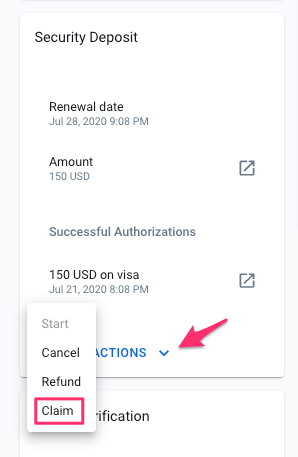
1. Directly through Autohost (note: every claim done through Autohost will incur a $5 fee.) by navigating to the guests' reservation details. Under "Security Deposit," click the dropdown beside "DEPOSIT ACTIONS" and select "Claim".
2. Directly through Stripe by locating the uncaptured payment in Stripe (Stripe fees may apply) and processing a claim while it’s still active.
Note: If you are taking this path, be sure to follow up by Canceling future security deposit events in Autohost by navigating to the guests' reservation details, locating "DEPOSIT ACTIONS" under the Security Deposit section, and selecting "CANCEL" from the dropdown menu.
2. Create an invoice and charge the credit card on file.
This option is suitable for higher claim amounts. In this case, you can create a new customer invoice on Stripe, and charge the credit card the guest has on file.
It is very important to do your due diligence when a claim is made against a guest's card. The exact process will depend on your internal policies and business practices, but in general, be sure to do the following:
- Inform and notify the guest of the charge.
- Explain to the guest why they are being charged. Remind them of your property rules, policies, and the terms of their rental agreement.
- When you are involved in a dispute, be sure to have prepared the necessary documentation. Learn how to respond to disputes through Stripe.
A credit card authorization can fail for many reasons. Learn about them by reading this informative article written by Stripe: Decline codes