---
title: Mews Integration Guide
description: Learn how to integrate Autohost with your Mews Account.
---
[Skip to content](https://help.autohost.ai/knowledge/mews-integration-guide#main-content)
English
Show submenu for translations
[Contact us](https://help.autohost.ai/knowledge/kb-tickets/new?hsLang=en)
[](https://www.autohost.ai/?hsLang=en)
Open main navigation
Close main navigation
- English
Show submenu for translations
- [Contact us](https://help.autohost.ai/knowledge/kb-tickets/new)
- [AI Agent](https://www.autohost.ai/chat)
[AI Agent](https://www.autohost.ai/chat?hsLang=en)
How can we help you?
- There are no suggestions because the search field is empty.
1. [Autohost Help Center](https://help.autohost.ai/knowledge?hsLang=en)
2. [Getting Started](https://help.autohost.ai/knowledge/getting-started?hsLang=en)
3. [Mews](https://help.autohost.ai/knowledge/getting-started?hsLang=en#mews)
# Mews Integration Guide
## Learn how to integrate Autohost with your Mews Account.
### Activation Steps
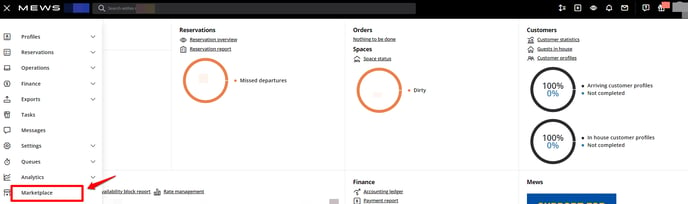
1. On Mews, visit the Integration Marketplace by clicking on the **Menu icon \>** **Marketplace**.
2. In the search bar, type '**Autohost.'** The Autohost integration module will appear on the right-hand side.
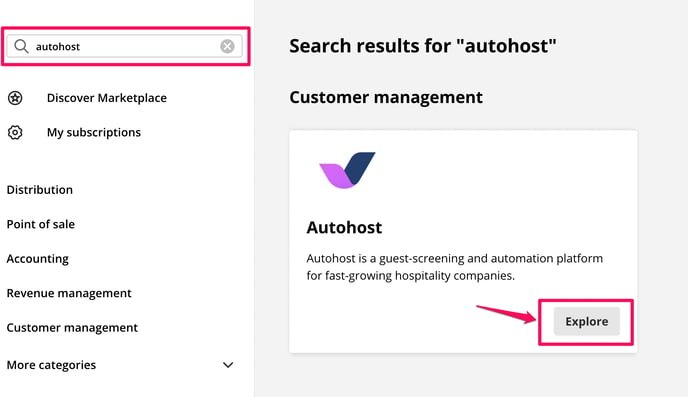
3. Next, click Explore to learn more about the Autohost integration.
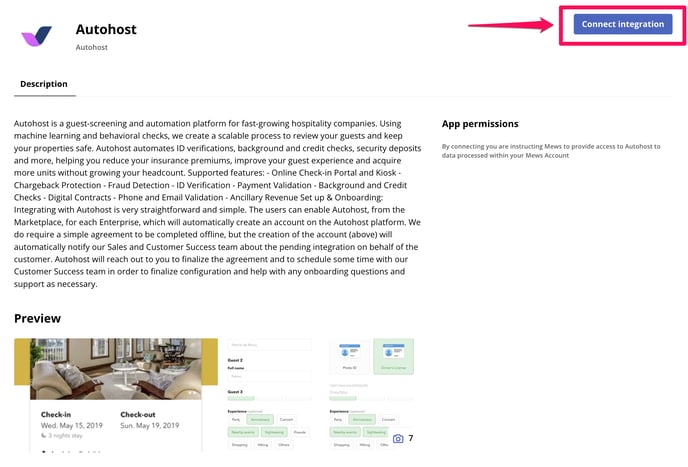
4. Click on **Connect integration**.
5. Once connected, **visit your email inbox.** You will receive a welcome email to Autohost with your credentials and a log-in link.
### Integration Details
**Check-in/Check-out Time**
The check-in and check-out time you've configured on Mews will override check-in and check-out times on Autohost.
**Buildings**
New buildings (or hotels) must be individually added.
- [Getting Started](https://help.autohost.ai/knowledge/getting-started?hsLang=en#main-content)
- [Apaleo](https://help.autohost.ai/knowledge/getting-started?hsLang=en#apaleo)
- [Cloudbeds](https://help.autohost.ai/knowledge/getting-started?hsLang=en#cloudbeds)
- [Escapia](https://help.autohost.ai/knowledge/getting-started?hsLang=en#escapia)
- [Guesty](https://help.autohost.ai/knowledge/getting-started?hsLang=en#guesty)
- [Hospitable](https://help.autohost.ai/knowledge/getting-started?hsLang=en#hospitable)
- [Hostaway](https://help.autohost.ai/knowledge/getting-started?hsLang=en#hostaway)
- [Hostfully](https://help.autohost.ai/knowledge/getting-started?hsLang=en#hostfully)
- [Mews](https://help.autohost.ai/knowledge/getting-started?hsLang=en#mews)
- [Streamline](https://help.autohost.ai/knowledge/getting-started?hsLang=en#streamline)
- [Track](https://help.autohost.ai/knowledge/getting-started?hsLang=en#track)
- [Account Settings](https://help.autohost.ai/knowledge/account-settings?hsLang=en#main-content)
- [User Accounts](https://help.autohost.ai/knowledge/account-settings?hsLang=en#user-accounts)
- [Settings](https://help.autohost.ai/knowledge/account-settings?hsLang=en#settings)
- [Billing](https://help.autohost.ai/knowledge/account-settings?hsLang=en#billing)
- [Integrations](https://help.autohost.ai/knowledge/account-settings?hsLang=en#integrations)
- [Data & Reports](https://help.autohost.ai/knowledge/account-settings?hsLang=en#data-reports)
- [Verifications and Risk](https://help.autohost.ai/knowledge/verifications-and-risk?hsLang=en#main-content)
- [Screening AI](https://help.autohost.ai/knowledge/verifications-and-risk?hsLang=en#screening-ai)
- [Screening Assistant Settings](https://help.autohost.ai/knowledge/verifications-and-risk?hsLang=en#screening-assistant-settings)
- [Types of Verifications and Checks](https://help.autohost.ai/knowledge/verifications-and-risk?hsLang=en#types-of-verifications-and-checks)
- [Listings](https://help.autohost.ai/knowledge/listings?hsLang=en)
- [Message Setup](https://help.autohost.ai/knowledge/message-setup?hsLang=en)
- [Guest Portal Setup](https://help.autohost.ai/knowledge/guest-portal-setup?hsLang=en#main-content)
- [Guest Portal Settings](https://help.autohost.ai/knowledge/guest-portal-setup?hsLang=en#guest-portal-settings)
- [Guest Portal Screen Configuration](https://help.autohost.ai/knowledge/guest-portal-setup?hsLang=en#guest-portal-screen-configuration)
- [Managing Reservations](https://help.autohost.ai/knowledge/managing-reservations?hsLang=en)
- [Autohost Product & Policies](https://help.autohost.ai/knowledge/autohost-product-policies?hsLang=en#main-content)
- [Privacy & Risk](https://help.autohost.ai/knowledge/autohost-product-policies?hsLang=en#privacy-risk)
- [Booking Channels (OTA)](https://help.autohost.ai/knowledge/autohost-product-policies?hsLang=en#booking-channels-ota)
- [Product Release Notes](https://help.autohost.ai/knowledge/autohost-product-policies?hsLang=en#product-release-notes)
- [FAQ](https://help.autohost.ai/knowledge/faq?hsLang=en#main-content)
- [Account, User & Payment FAQs](https://help.autohost.ai/knowledge/faq?hsLang=en#account-user-payment-faqs)
- [Reservation Management FAQs](https://help.autohost.ai/knowledge/faq?hsLang=en#reservation-management-faqs)
- [Product FAQs](https://help.autohost.ai/knowledge/faq?hsLang=en#product-faqs)
- [PMS & OTA FAQs](https://help.autohost.ai/knowledge/faq?hsLang=en#pms-ota-faqs)
- [Guest FAQs](https://help.autohost.ai/knowledge/faq?hsLang=en#guest-faqs)
- [Autohost SDK](https://help.autohost.ai/knowledge/autohost-sdk?hsLang=en)
[](https://help.autohost.ai/knowledge?hsLang=en)
Autohost Help Center
Copyright © 2025, Autohost.ai